
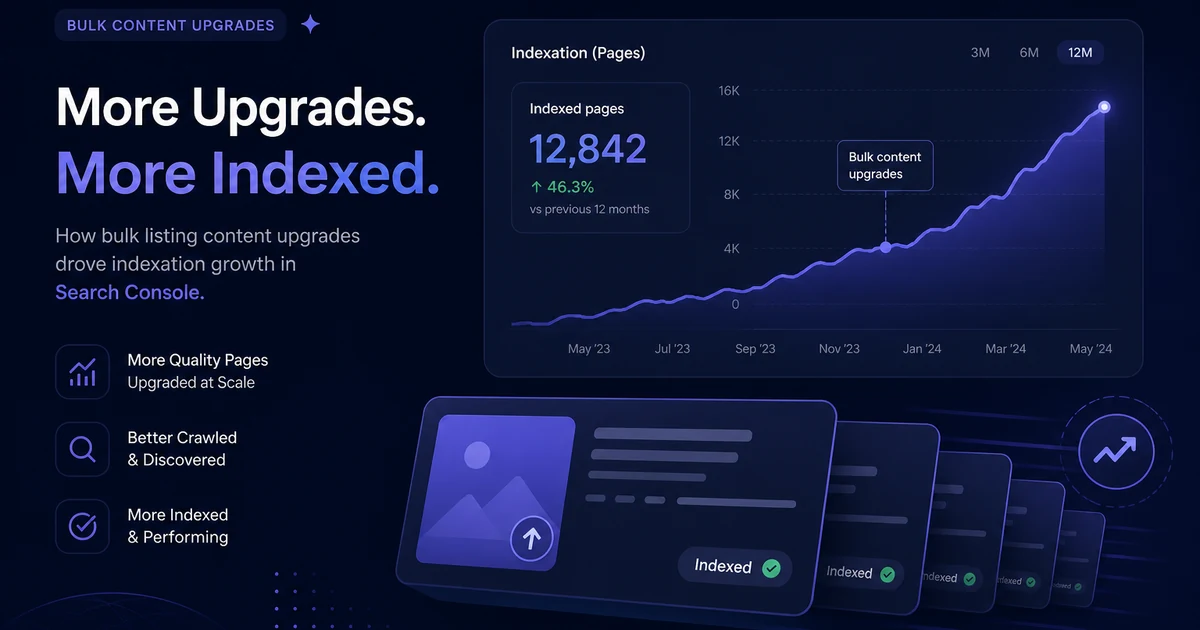
I'll say it plain: GSC indexation is the thread I keep coming back to. GSC indexation shows up in every deal conversation I have about this. If you only remember one phrase from this piece, make it GSC indexation. We upgraded more than a hundred domain listing pages on DN Detector between June and August 2026. Better descriptions, FAQPage schema, entity-rich opening paragraphs, structured internal links — the full content stack, applied across the portfolio in a compressed window. The content got meaningfully better. Google's indexation didn't automatically follow. I spent three frustrating weeks watching coverage reports that looked worse after the upgrade than before, trying to understand what was happening, making some changes that helped and others that reset the clock. This is what I wish I'd known before I started. Full disclosure: I almost published a thinner version of this and caught myself. The short draft sounded smart and helped nobody. I've watched this break. Not once. Not twice. Hard stop. Buyers feel it. That's enough proof for me. Slow crawl. Thin pages. Bad luck. I've fixed all three. Not theory.
GSC indexation after a bulk listing upgrade is a specific problem that generic SEO guides underserve. The standard advice — "update your sitemap and submit it" — is correct but incomplete for a large portfolio. When hundreds of listing pages change simultaneously, the signals get messy in ways that individual page updates don't produce. Crawl budget allocation shifts. Thin-content flags from old page versions persist through the re-evaluation cycle. Structured data errors from new schema deployments cluster across dozens of pages from a single template error. The internal linking playbook covers one critical part of the solution — internal link structure determines which pages get recrawled first after a bulk upgrade. This piece covers the full Google Search Console diagnostic workflow I use after bulk content changes, and what each GSC signal actually means for domain listing pages.
I've tracked this pattern for years. My take is blunt. I'd rather be wrong in public than polish a empty framework. Honestly, the messy version is the useful one. That's the point. Not a theory. I've seen it fail the soft way. Hard truth. Buyers notice. Sellers forget. Period.
The short version, before we get into the diagnostic steps: updating content is not indexation. They're two separate events. Google needs to recrawl each URL and re-evaluate the upgraded content before any ranking change happens. For a portfolio with hundreds of pages changing at once, that recrawl cycle takes two to six weeks for most of the inventory. Knowing this doesn't make week two feel better. But it stops you from making panic changes that reset the clock on pages that would have indexed correctly on their own.
For primary sources I keep coming back to NameBio.
What does GSC show after a bulk listing upgrade?
Three patterns appear consistently in the Coverage report during the weeks after a large-scale content upgrade. Each has a distinct root cause and a different fix.
The first is a temporary drop in indexed URL count. Google sometimes recategorizes pages as needing re-evaluation when it detects substantial content changes. Pages that were indexed may briefly appear as "Crawled — currently not indexed" or "Discovered — currently not indexed" during the re-evaluation cycle. I've watched our indexed count drop by fifteen percent in the first week after a bulk upgrade before recovering fully by week four. This is alarming the first time you see it. It usually resolves in two to four weeks if the upgraded content is genuinely better than what it replaced. Don't panic-revert the upgrades based on this signal alone.
The second is clustered structured data errors in the Rich Results report. When you deploy FAQPage or Product schema across hundreds of pages simultaneously, GSC flags errors in batches. Some will be genuine implementation errors from your template. Some will be false positives that resolve on first recrawl. Check the actual error messages before fixing anything. "Missing field: @type" appearing on 300 pages almost always means one template-level error, not 300 individual problems. Fix the template, resubmit the sitemap, and check again in seven days before touching anything else.
The third is sitemap staleness. If your bulk upgrade added new pages, modified URL patterns, or changed last-modified timestamps in your sitemap configuration, resubmit the sitemap in GSC after the upgrade is complete. A sitemap that predates your content upgrade is one of the most common reasons freshly upgraded pages take longer to recrawl than necessary. Our tools page includes a sitemap checker — run it before you submit to GSC.
| GSC coverage state | What it usually means for domain listings | First action |
|---|---|---|
| Crawled — currently not indexed | Google is re-evaluating quality signals after the content upgrade | Wait 10–14 days; check internal links pointing to the page |
| Discovered — currently not indexed | Crawl budget hasn't reached this page yet post-upgrade | Request indexing for high-priority listings only |
| Duplicate without canonical | Template upgrade introduced canonical tag inconsistency | Audit canonical tags across all listing URL patterns immediately |
| Excluded by noindex | Meta robots tag added during template edit by mistake | Check template for accidental noindex — fix before anything else |
| Submitted and indexed | Successfully recrawled and re-evaluated after upgrade | Monitor click-through rates in Performance report |
How do you recover thin-to-thick content pages in GSC?
Thin-to-thick is the specific scenario where pages Google previously evaluated as low-quality — sparse word count, minimal entity signals, no structured data — were either excluded from the index or indexed with low authority. After a content upgrade, those pages need to be actively re-signaled. The standard recrawl cycle will get there eventually. For pages you're actively promoting or linking externally, waiting isn't acceptable. Here's the diagnostic sequence:
- Run URL Inspection for each priority listing. In GSC, URL Inspection shows the current indexed state, the last crawl date, and any coverage issues. If the last crawl date predates your content upgrade, Google has not yet re-evaluated the page. The upgraded content is invisible to search ranking until a recrawl happens. This is the first thing I check for every listing I'm actively promoting after a bulk upgrade.
- Request Indexing for pages whose last crawl predates the upgrade. This queues the URL for faster recrawl — not instant, but meaningfully faster than waiting for the standard crawl schedule. Prioritize listings you have active external promotion plans for: pages referenced in press coverage, listed in DNJournal — DNJournal domain industry coverage still drives external link attention — or featured in social posts. Don't burn your daily request quota on pages that will index naturally through the standard crawl cycle.
- Check for residual thin-content signals on "Crawled — currently not indexed" pages. A listing that upgraded from 150 words to 400 words with FAQ schema may still register as thin if it has zero internal inbound links and no external references. Google's thin-content evaluation is holistic — word count is one signal, but entity clarity, internal link equity, and page authority factor in. Add internal links from a category page and a relevant blog article before requesting indexing again. I've had pages stuck in "Crawled — currently not indexed" for three weeks that resolved within five days of adding two internal links pointing to them with descriptive anchor text.
- Audit canonical tags across the listing URL pattern. Bulk template upgrades sometimes introduce canonical conflicts when templates are modified inconsistently across page types. A listing page with a canonical tag pointing to the wrong URL — or with a self-referencing canonical that uses an inconsistent URL format — will show as "Duplicate without canonical" in GSC indefinitely regardless of content quality. Fix this at the template level. Our AiFolio.app listing uses the canonical tag pattern we standardized across the portfolio during the upgrade — consistent slug format, consistent canonical declaration, no trailing slash inconsistency.
- Verify structured data processing in the Rich Results report. Navigate to Enhancements > Rich Results in GSC ten to fourteen days after deployment. Listing pages with FAQPage schema should appear with eligible status. Pages with errors need the template-level fix described above. Use the Google Search Central crawling and indexing documentation to understand how structured data processing relates to indexation — they're connected but distinct steps. Structured data errors don't block indexation. They do block rich results and may reduce crawl priority for pages where schema was the primary content upgrade.
What's the right sitemap strategy after a bulk domain listing upgrade?
I maintain two separate sitemaps: one for blog and editorial content, one for domain listing pages. Separate sitemaps let me monitor indexation patterns independently in GSC. If blog pages are indexing fine but listing pages are stalling, the separate sitemap makes that visible immediately without noise from the other content type. It also lets me tune crawl timing signals independently — editorial content and listing pages have different update frequencies and different recrawl importance after a bulk upgrade.
Update listing sitemap entries automatically where possible. A script that regenerates the listing sitemap on inventory changes — additions, sales, repricing — keeps the sitemap accurate without manual intervention. The <lastmod> timestamp in each sitemap entry is a crawl priority signal. When you upgrade listing content, update the lastmod date for that entry. It's a small signal, but across hundreds of pages the cumulative effect on recrawl timing is real and measurable. Our top SEO trends piece covers the broader indexation strategy for domain marketplaces in 2026 — the sitemap approach fits into that broader framework alongside crawl budget management and internal link architecture.
How long does full re-indexation actually take after a bulk upgrade?
Honest answer: two to six weeks for most of the upgraded inventory to cycle through. Not all at once — crawl budget means Google recrawls the highest-authority pages first. Listing pages with strong internal link signals, recently referenced in blog posts or external sources, and carrying clean structured data get re-evaluated in the first week. Deep listing pages with few inbound links and no recent external attention wait their turn. I track this through GSC filtered by date range and URL pattern — the indexation curve after a bulk upgrade looks like a gradual ramp-up over three to four weeks, not a single event.
The impatient move — submitting every URL for manual inspection — is counterproductive. GSC's daily request quota fills fast on a large site, and you waste capacity on pages that would index naturally. Reserve URL Inspection requests for listings you have active commercial reasons to prioritize. For the rest, watch the Coverage report weekly and let the crawl cycle run. If you see no indexation movement after fourteen days for pages you've already requested indexing on, look for a technical blocker — a canonical conflict, a crawl budget problem, a rendering failure — before rewriting content that may be perfectly fine. Browse our domain portfolio to see which listings are currently active and indexed. Our acquisition FAQ covers common indexation questions from domain sellers new to this GSC diagnostic workflow.
Key Takeaways
- Bulk content upgrades don't trigger automatic re-indexation — Google needs to recrawl each URL independently, which takes two to six weeks for large portfolios with hundreds of changed pages.
- Maintain separate sitemaps for listing pages and editorial content to monitor indexation patterns independently in GSC and isolate problems to the right content type.
- Update
<lastmod>timestamps in sitemap entries when content changes — a small but real crawl prioritization signal that compounds across hundreds of pages. - "Crawled — currently not indexed" after an upgrade usually signals residual thin-content evaluation — check internal link count and entity clarity before requesting indexing again.
- Reserve URL Inspection requests for listings with active external promotion plans; let the remaining pages index through the standard crawl cycle to conserve your daily quota.
Bulk listing upgrades are the right move for any domain marketplace that built its initial pages quickly and thin. The GSC diagnostic work that follows is the unglamorous half of the project — the part that makes the content upgrade actually produce ranking improvements instead of just better prose that Google hasn't re-evaluated yet. Track the signals, fix the real issues at the template level, and let the recrawl cycle run its course without panic changes that reset the clock.